
FPS vs HZ: what’s the difference?
If you’ve ever tinkered with display settings, upgraded a gaming monitor, or shopped for an LED screen, you’ve likely seen two terms pop up again and again: Hz and FPS. They’re everywhere—product sheets, tech reviews, graphics settings—and they often get tossed around as if they mean the same thing. But they don’t. In fact, confusing Hz (Hertz) and FPS (frames per second) is one of the most common misunderstandings in the world of displays and motion rendering.
And yet, the relationship between the two is fascinating. Almost poetic, even. One is about what a device can show, and the other is about what a system can produce. They work together, clash sometimes, and—when perfectly aligned—create some of the smoothest visual experiences you can imagine.
This guide unpacks their differences, their connection, and how much each one matters depending on what you do—whether you’re an intense gamer, movie lover, LED display designer, or just someone who wants a smoother computer experience.
Let’s dive deep.
1. What are Hz and FPS?
What Is Hz?
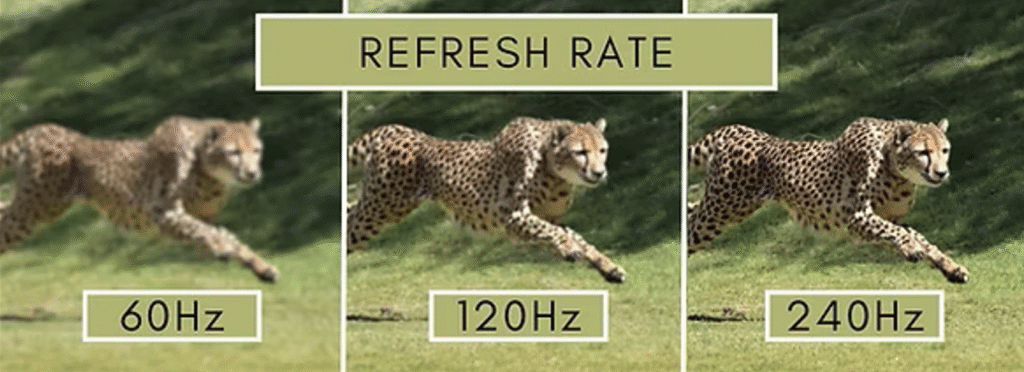
Hz (Hertz) is a unit that measures frequency—specifically, how many times something happens per second. In the context of screens, refresh rate is measured in Hz. A 60 Hz display refreshes the image 60 times every second.
Think of it as how often the monitor updates the picture.
Common refresh rate values include:
60 Hz
75 Hz
120 Hz
144 Hz
240 Hz
360 Hz (found on some esports-focused monitors)
Higher Hz typically means smoother motion, less blur, and better responsiveness—but only if the visual content matches it, which is where FPS comes in.
What Is FPS?
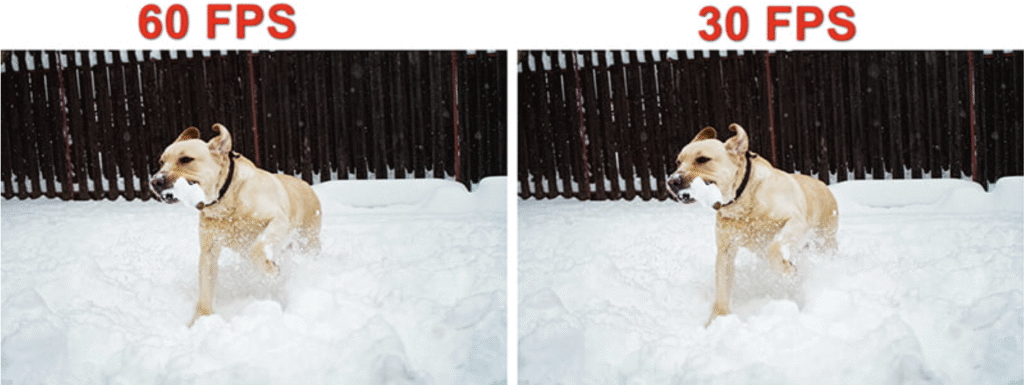
FPS (frames per second) is the number of individual frames—static images—that your graphics pipeline creates each second. Games generate FPS using the GPU and CPU. Videos come with fixed frame rates like 24 fps, 30 fps, or 60 fps.
FPS is about content production.
Hz is about content display.
If your graphics card generates 200 FPS, that means it creates 200 unique images every second. Whether your monitor can show all of them is a different story.
2. The Difference Between Hz and FPS
Now that the definitions are clear, the distinction becomes obvious.
FPS = how many frames are created.
Hz = how many frames are shown.
They operate in two different worlds:
| Category | FPS | Hz |
|---|---|---|
| Source | GPU/CPU output | Display hardware |
| Function | Produces frames | Displays frames |
| Determines | Smoothness of motion input | Smoothness of visual output |
| Influences | Gameplay responsiveness | Visual clarity & fluidity |
| Limitations | Hardware processing power | Screen technology |
An analogy:
FPS is like how many photos your camera takes per second. Hz is like how many photos your slideshow projector can show per second.
You could take 200 photos per second, but if your projector only cycles slides at 60 per second, you’re only seeing 60.
This difference matters profoundly for gamers, video viewers, and display designers.
3. The Relation Between Hz and FPS
While they’re different, Hz and FPS interact closely—almost like dance partners.
A mismatched pair creates bottlenecks.
If your FPS > Hz, the monitor can’t show all the frames. They get wasted.
If your FPS < Hz, the screen refreshes more times than new frames are created, causing repeated frames and choppy visuals.
Perfect pairing feels magical.
When FPS and Hz are aligned—say 120 FPS on a 120 Hz screen—motion looks and feels incredibly smooth. Rapid camera movements glide, animations are crisp, and latency drops dramatically.
They influence latency.
High FPS reduces input delay.
High Hz reduces display delay.
That’s why pro gamers chase both.
4. Which One Matters More for Different Users?
Different users value Hz and FPS differently. Here’s how it breaks down.
Gamers
For gamers, the relationship between Hz and FPS is everything. Competitive players live or die by reaction time, motion clarity, and input latency. Every millisecond counts.
FPS matters because:
Higher FPS reduces input lag.
Fast-moving scenes become easier to track.
Controls feel smoother and more responsive.
Hz matters because:
A higher refresh rate allows the screen to show the extra frames.
It reduces motion blur.
It improves visual clarity for fast action, like tracking an enemy flick shot.
Which one matters more?
Both—but if you must choose:
FPS matters more for responsiveness.
Hz matters more for visual fluidity.
For competitive gamers:
144 Hz + 144 FPS is a minimum.
240 Hz or 360 Hz screens are becoming the standard in esports.
Verdict for gamers: You need BOTH.
Movie Viewers
Movie watchers live in a different world. Films are almost always shot in:
24 fps (cinema standard)
30 fps (TV)
60 fps (limited productions & some documentaries)
Because movie frame rates are fixed, FPS isn’t adjustable.
Hz matters because:
A higher refresh rate can reduce flicker.
120 Hz screens often play 24 fps movies more cleanly due to better frame cadence.
Motion interpolation (sometimes love it or hate it) works better on high-Hz displays.
FPS matters less because:
Movies do not benefit from higher FPS unless the source content was filmed that way.
Verdict for movie lovers: Hz matters more, but only moderately. FPS is fixed.
LED Screen Users
This category includes people in:
Digital signage
Advertising displays
Stage backdrops
Large-scale LED walls
Here, neither gamers’ nor movie lovers’ requirements apply.
LED screens have unique demands.
FPS matters because:
Videos played on LED walls need proper frame delivery to avoid flicker.
Some LED controllers require higher FPS to avoid tearing or artifacts.
Hz matters much more because:
LED panels rely on refresh rate for image stability.
Low-Hz LED screens can create visible flicker, especially in cameras.
High-Hz screens are essential for stage filming and live broadcasts.
A low refresh rate LED screen can look fine to the naked eye—but terrible on camera.
Verdict for LED users: Hz is the priority, especially for camera-facing installations.
Computer Users (Everyday Work)
For work tasks like browsing, spreadsheets, reading, or coding:
FPS is stable and low.
Office applications run at modest frame rates.
Hz matters more.
A 120 Hz or 144 Hz monitor:
Reduces eye strain
Makes scrolling smoother
Helps with multitasking
Provides a more pleasant desktop experience
Even without high FPS content, high refresh rates feel noticeably better on the desktop.
Verdict for everyday users: Hz > FPS.
5. How Hz and FPS Affect an LED Display
LED displays operate under different constraints compared to consumer monitors. They rely heavily on refresh rate, scan rate, and controller processing.
Here’s how Hz and FPS influence LED performance:
1. Flicker and Stability
LED modules refresh their pixels rapidly in rows or columns.
A high refresh rate (often 1920 Hz to 7680 Hz in professional LED screens) ensures:
No flickering under camera capture
Smooth playback
Stable color representation
If FPS is too low or mismatched with the panel’s refresh rate, you may notice:
Ghosting
Judder
Frame duplication
2. Motion Clarity
High FPS allows the LED screen to deliver more visual information when playing animations or fast-motion content. Combining that with a high-Hz panel produces:
Crisp transitional frames
Better perception of fast-moving text
Improved immersive viewing
This is why stadium screens, concert backdrops, and advertising boards favor high-refresh LED systems.
3. Input Latency for Real-Time Use
In live control rooms, stage productions, or interactive LED installations:
High FPS reduces processing delay.
High Hz reduces display delay.
Together, they prevent visual lag, especially when operators need to respond to events in real time.
4. Camera Interaction
A low-Hz LED screen often causes:
Rolling bars on video
Banding and flicker
Color shifts
For camera-friendly LED backdrops, manufacturers use extremely high refresh rates (sometimes 3840 Hz+).
The Ideal Pairing for LED Displays
General installations: 1920 Hz+
Live events: 3840 Hz+
Film production LED volumes: 7680 Hz+
Source content FPS: ideally 60–120 fps
Balancing both results in a stable, clean, professional display output.
6. Conclusion
Hz and FPS are not interchangeable—they live on opposite sides of the visual experience. FPS is created by the system; Hz is delivered by the display. One represents production. The other represents presentation.
Their difference is simple:
FPS measures how many frames are produced each second.
Hz measures how many times the screen refreshes each second.
Their relationship is important:
When FPS > Hz, frames are wasted.
When FPS < Hz, motion looks choppy.
When FPS = Hz, you get the smoothest experience.
Which matters more depends entirely on the user:
Gamers need both.
Movie lovers rely mainly on Hz.
LED screen operators prioritize refresh rate more than anything.
Everyday computer users benefit most from high Hz.
Finally, LED displays rely on both factors to ensure stable, flicker-free, camera-friendly performance.
Understanding Hz and FPS empowers you to make smarter decisions—whether you’re buying a new monitor, designing an LED display, or simply trying to improve your viewing experience. When both work in harmony, the result is nothing short of stunning.