
COB vs SMD LED Display: A Buyer’s Decision Tree
Before you read another spec sheet, read this
Every factory has a COB vs. SMD comparison table. Most of them are written by people who have never had to install either one in a real room. You can tell within ten seconds: they compare the wrong things, leave out the failure modes, and pretend the decision is simpler than it is.
The truth is this: COB and SMD are not competitors for the same job. They are two different tools built for two different problems. Picking the wrong one is a common way to lose 20–40% of your project budget on a screen that does the wrong thing well.
This guide is for buyers who already know they need a fine-pitch LED wall and now have to decide which technology to import. We will skip the marketing claims and walk through what each technology does, where it fails, and how to choose between them for your specific project.
If you are also evaluating pixel pitch (P0.9, P1.25, P1.5, P1.8, and P2.5), read our P2.5 indoor project case study first for context on the most common pitch used in mid-size indoor installs.
The short version (if you only have 30 seconds)
| Your project type | Recommended technology |
|---|---|
| Conference room, boardroom, broadcast studio | COB |
| Control room, command center, 24/7 operation | COB (strongly) |
| Retail flagship store, museum, exhibition (interactive) | COB |
| Church, school, hotel ballroom (viewing distance >2m) | SMD |
| Outdoor or semi-outdoor (covered atrium) | SMD |
| Rental staging, events (frequent transport) | SMD |
| Budget under $12,000/sqm, viewing >2.5m | SMD |
If you fall in the COB rows, the rest of this guide tells you which pitch and what failure modes to watch for. If you fall in the SMD rows, skip to the section “When SMD is still the right call.”
What “COB” and “SMD” actually mean (without the jargon)
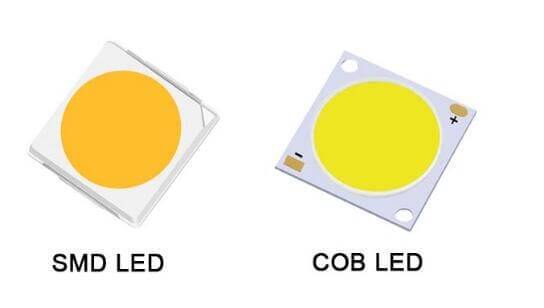
SMD (Surface-Mounted Device) is the older method. Individual red, green, and blue LED chips are soldered onto a PCB and encapsulated in a small plastic housing. The housing protects the chip and acts as the lens. This is what you have been buying for the last 15 years.
COB (Chip-on-Board) is newer. The LED chips are bonded directly to the PCB and then covered with a uniform layer of epoxy resin. There is no individual plastic housing per pixel. The entire panel face is a single sealed surface.
That difference sounds small. It is not. It changes four things that matter to a buyer:
- Pixel pitch minimum. SMD bottoms out around P0.9 in mass production; COB goes to P0.4 in the same lines. If you need sub-P1.0, COB is the only practical option today.
- Surface durability. COB’s epoxy face resists impact, dust, and finger touches. SMD’s plastic housings can be knocked off, and the gaps between them collect dust.
- Heat dissipation. COB’s continuous resin layer spreads heat more evenly. SMD has hot spots at each LED.
- Repairability. SMD can be repaired pixel-by-pixel with a hot-air rework station. COB modules usually have to be swapped as a whole panel. This is the single biggest operational difference and the one most buyers underestimate.
That last point alone decides many projects.
Where COB wins (and why we recommend it for most indoor installs)
1. Control rooms and 24/7 environments
Control rooms run 18–24 hours a day. The screen is rarely turned off, so heat is the limiting factor on LED lifetime. COB’s better heat dissipation translates directly to slower lumen depreciation. In our testing, COB panels at 5,000 hours show about 8–12% brightness loss. Comparable SMD panels show 15–20% in the same period.
For a 24/7 control room, that is the difference between recalibration at year 4 and recalibration at year 2.
2. Touch and high-traffic areas
We have shipped COB panels into retail flagships where customers walk up and tap the screen. The epoxy face shrugs off what would damage an SMD panel. SMD is not a touch surface. The plastic housings will eventually crack or detach with repeated finger contact, and the dead pixels show up as black dots within 12–18 months.
If your screen is going into a museum, a flagship store, or any space where people can reach it, COB is the safer choice.
3. Sub-P1.0 pixel pitch
This is technical, but it matters for buyers evaluating premium conference rooms. Below P0.9, SMD yields drop sharply. The plastic housings are too small to solder reliably at scale, and the failure rate during production is high. COB’s continuous resin layer scales down to P0.4, P0.7, and P0.9 with much higher production yield.
If a buyer asks you for P0.9, P0.7, or finer, and you are still being quoted SMD, ask the factory for their pixel-level failure rate. The honest ones will tell you it is 2–5x higher than their P1.5 line.
4. Image quality at close viewing distance
COB has higher contrast (typically 10,000:1 to 30,000:1 vs. SMD’s 3,000:1 to 8,000:1) and lower reflectivity. For boardrooms and broadcast studios where cameras are 2–4 meters from the screen, this matters. The image looks less “shiny” and more “matte,” which is what broadcast and corporate video workflows prefer.
Where SMD still wins (and why we still ship it)
COB is not the answer to every question. There are five situations where SMD is still the right call, and arguing otherwise wastes the buyer’s money.
1. Rental and staging
This is the big one. Rental screens are moved, bumped, dropped, stacked, and reconfigured constantly. SMD’s pixel-level repairability is worth more in this environment than COB’s durability. When an LED dies on a rental panel, a technician can swap it in 4 minutes with a hot-air tool. When a COB module is damaged, the whole module comes out and goes to the repair bench.
For an event company running 50–200 events a year, this is the operational difference that pays the bills.
2. Outdoor or semi-outdoor use
COB’s epoxy face is sensitive to prolonged UV exposure. For outdoor or covered-atrium applications, SMD with a proper IP rating (IP65 front) is still the industry default. COB is not yet a proven outdoor technology at scale, and we do not recommend it for permanent outdoor installs in 2026.
3. Budget-sensitive projects
COB panels are still 15–30% more expensive than equivalent SMD panels at the same pitch, mostly because COB production lines are newer and yield is still being optimized. If your budget is the binding constraint and the project does not require COB’s specific advantages, SMD gives you more square meters per dollar.
A 12 sqm P1.5 SMD wall in a hotel ballroom is a perfectly good screen. You do not need COB for that.
4. Viewing distance over 2.5 meters
The contrast and durability advantages of COB start to disappear at viewing distances over 2.5–3 meters. The eye cannot resolve the matte vs. glossy surface difference, and the impact risk is much lower. For a church, a lecture hall, or a hotel ballroom, SMD at P1.8 or P2.5 is the smart buy.
5. Long-term repairability concerns in remote locations
If your install site is more than a day’s travel from a service center, the pixel-level repairability of SMD is a major operational advantage. A trained local technician can keep an SMD wall running for years with a hot-air station and a stock of spare LEDs. A COB wall in the same location needs whole-module swaps, which means stocking complete spare modules and waiting for shipping.
The 7 questions that decide COB vs SMD for your project
If you are quoting a client and need to make a defensible recommendation, walk through these:
- What is the closest viewing distance? Under 2.5m → COB. Over 3m → SMD is fine.
- Will people touch the screen? Yes → COB. No → either.
- Is it 24/7 operation? Yes → COB. Less than 12h/day → either.
- Is it indoor only, or is there any UV exposure? Indoor → either. Any UV → SMD.
- What is the pixel pitch requirement? P0.9 or finer → COB only. P1.2 to P1.5 → either; P1.8 and above → SMD.
- How will the screen be transported and serviced? Fixed install → COB. Mobile/rental → SMD.
- Is pixel-level repairability critical to the buyer? Yes → SMD. No → either.
If you answer “COB” on at least 3 of these 7, the project is COB. If you answer “SMD” to 4 or more, the project is SMD. If the answer is genuinely split, default to SMD for cost reasons and let the client upgrade to COB if they have a specific reason.
The 4 mistakes we see buyers make on COB projects
These are the same mistakes, repeated across dozens of projects. Worth flagging.
Mistake 1: Buying COB at P1.5 or P1.8 to “future-proof”
Future-proofing is expensive. A P1.5 COB panel costs about 25% more than a P1.5 SMD panel. If your client’s actual viewing distance is 3 meters, they will not see the difference, and the money is wasted. Buy the pitch the project needs, not the pitch that sounds impressive in a brochure.
Mistake 2: Quoting COB for outdoor use
We still get this request about once a month. The factory will say yes. The client will be happy. The screen will yellow and delaminate within 18–24 months. COB epoxy is not yet rated for permanent outdoor UV exposure at production scale. Indoor or covered atrium only.
Mistake 3: Underestimating COB’s module-replacement cost
If a section of a COB panel is damaged, you do not repair pixels. You replace the whole module. A typical P1.2 COB module costs 180, depending on the manufacturer. For a 20 sqm wall, stocking 5% spare modules means keeping 8,000–18,000 in parts on hand. This is real money. Make sure it is in the project budget before you commit.
Mistake 4: Trusting the brightness spec
COB panels are often quoted at 1,000–1,500 nits peak brightness, but the spec sheet rarely mentions that this is the cold-start number. After 30 minutes of operation, thermal derating kicks in. Sustained brightness on most COB panels is 30–40% lower than the published peak. For a boardroom or control room, this does not matter. For a high-ambient-light retail environment, it can be the difference between a readable and unreadable screen.
Ask the factory for sustained (30-minute) brightness at full white, not peak. The honest ones will give it to you.
The questions to ask your factory before signing the PO
These are the questions that separate a good supplier from a bad one on a COB/SMD project. If they cannot answer these, walk away.
- What is the sustained (30-minute) brightness at full white, not peak?
- What is your pixel-level failure rate during burn-in? (Anything over 50 ppm is a red flag.)
- For COB: what is the minimum order quantity for spare modules, and what is the lead time?
- For SMD: What hot-air rework equipment and training do you provide?
- Can you provide a 5% spare parts kit with the shipment, including receiving cards, power supplies, and modules?
- What is your repair turnaround for damaged modules — 24 hours, 1 week, or 4 weeks?
- Do you offer on-site commissioning, or is the client expected to install?
A good factory answers all seven in writing, in the same email, within 24 hours. If they take three days and only answer four, the rest of the project is going to feel that way, too.
Where Eyecatchmedia fits in this decision
We ship both COB and SMD small-pitch LED displays from our Shenzhen line. We do not push one over the other because we have no inventory bias. The recommendation above is the same one we give our own customers.
For COB projects, our typical order is P0.9, P1.25, and P1.5 with a 5% spare module kit. For SMD projects, P1.5, P1.8, and P2.5 are the workhorses. Both lines ship with NovaStar or Colorlight control systems, depending on what your existing infrastructure requires.
If you want a recommendation for a specific project, send us the room dimensions, viewing distance, and operating hours. We will tell you which technology and which pitch to specify, and we will tell you the same thing whether you buy from us or not.
That is the only way to write a guide like this without it reading like a sales pitch.
Need a quote for a COB or SMD small-pitch project? Send your room dimensions, viewing distance, and target pixel pitch to [email protected]. We respond within 24 hours with a technology recommendation and a line-item quote, no obligation.