
LED Poster Display Guide: Specs, Use Cases & Real Prices
An LED poster display is a 600×1800mm portable screen on wheels that shows your promotions at 1,500 nits — roughly three times brighter than an indoor LCD — and updates over Wi-Fi, USB or optional 4G cloud in minutes. Expect $700–1,100 FOB for a P2.5 unit. It replaces the printed A-board that goes stale every campaign.
The A-board outside your door was designed last month, printed last week, and went out of date on Tuesday when the promotion changed. Every swap costs a designer’s invoice, a print run and somebody’s lunch hour taping the new poster up. An LED poster display is the digital A-board that never goes stale: new prices pushed from your phone in about two minutes, same sidewalk position.
So the honest question is the money one. At $700–1,100 before shipping, when does a screen pay for itself? The rest of this page answers that with arithmetic rather than vibes. One disclosure first: I sell these displays for a living, so weigh my bias — but every number below is one you can check against your own print invoices and staff schedules.
What Actually Is It, and Why 600×1800mm Won
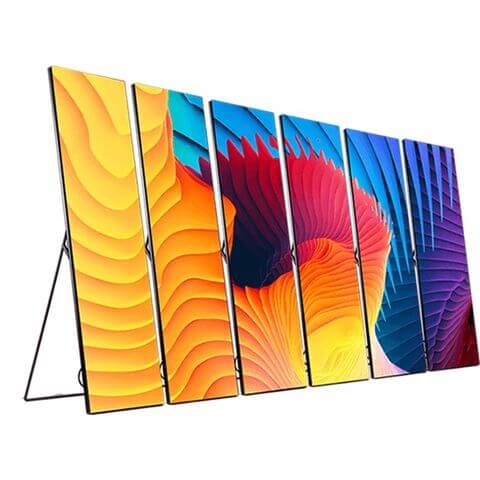
A poster-sized screen that stands up on its own: 600×1800mm of LED in a slim frame riding on caster wheels, 25–30 kg, one person repositions it in seconds. The panel runs 1,500 nits at 3840Hz refresh — bright enough to read through shop glass on a sunny afternoon, flicker-free when customers film the window. Full specifications sit on our LED poster product page.
The size is not an accident. It’s two constraints shaking hands. First, one person has to carry it: at 600 mm wide it passes a standard door frame with room to spare, and at 25–30 kg it’s a two-hand carry, not a two-person job — wider, and you’re disassembling frames in hotel lobbies at 7 a.m., and nobody wins that morning. Second, it has to read from across a street-facing window: the 1:3 aspect matches three stacked 16:9 ad creatives, and content designed for a phone screen — which is 9:16, which is what your designers are already making — scales onto it with almost no rework. The LED poster display is just a bigger phone. Design once, run it on the poster, the socials, and the window.
When an LED Poster Beats Print: The Swap Math
Print’s real cost was never the poster. It is the swap. Between design time, the print shop and a member of staff peeling old tape off the glass, a campaign change runs $50–150 all-in. Fortnightly changes — normal for retail, glacial for F&B — mean 24 swaps a year and $1,200–3,600 spent on ink and labor. Those figures are illustrative, but most shop owners who run the sums against their own invoices land somewhere in that band.
A P2.5 LED poster is $700–1,100, once. After that, a price change costs two minutes of your manager’s commute.
Print dies quietly. Screens don’t.
| Swap cadence | Swaps/year | Annual print spend* | LED poster, year one | Payback |
| Monthly | 12 | $600–1,800 | $700–1,100, once | 5–22 months |
| Weekly | 52 | $2,600–7,800 | $700–1,100, once | 5–22 weeks |
| Twice weekly | 104 | $5,200–15,600 | $700–1,100, once | 3–11 weeks |
*Assumes $50–150 per swap (design, printing, staff time). Substitute your own numbers; the conclusion rarely moves by more than a month or two.
And the counter-case, stated plainly because not every supplier will say it: if your campaigns change less often than monthly, keep printing. A screen looping the same artwork for six weeks is a very expensive print, and print looks better at rest. The LED poster earns its money on change — frequency is the whole business case.
LED Poster vs LCD Digital Poster vs Projector
| LED poster display | LCD digital poster | Projector | |
| Helderheid | 1,500 nits — readable behind sunny glass | 350–500 nits — fine in dim interiors, washes out near windows | Loses to any ambient light |
| Kijken op | Sealed LED matrix; no glare, wide angles | Glass panel reflects your shop lights back at customers | Needs a dark room and a flat surface |
| Portability | 25–30 kg on casters; one person moves it | Lighter, but usually wall-mounted | Lightest, useless in daylight |
| Multi-unit canvas | Cascading: 4 units play as one 2.4×1.8m screen | Video walls need controllers, mounts, a technician | No equivalent |
| Typical cost | $700–1,100 FOB at P2.5 | $400–900 plus stand and media player | $300–800 plus screen and install |
| Verdict | Bright, movable, day-one content | A dim reception wall on a tight budget | Skip it for retail; conference-room tool |
Projectors belong in meeting rooms. Next question.
Which Pitch and Config Do I Need?
Pitch. P2.5 is the workhorse and where the LED poster price starts: $700–1,100 FOB. It reads sharply from about 2.5 metres out, which covers retail windows, menu boards and corridors. P1.5 runs $1,100–1,800 and only earns its premium when people stand inside 1.5 metres — check-in desks, salon counters. My rule is blunt: P1.5 is wasted money on anyone viewing from further than a metre and a half. A fuller walkthrough lives in our pitch selection guide.
Brightness, the spec that gets faked most. The honest minimum for a window-facing unit is 1,500 nits. The cheap listings at 700–900 nits are fine in a dim corridor; put them behind sunny glass at noon and they vanish — literally: the glass becomes a mirror and your ad becomes a rumor. We get the return calls. The unit wasn’t broken; the spec was honest about brightness and dishonest about the sun. Ask for the nit figure on the quotation, not in the brochure. And peak is only half the story — a poster at full blast in a hotel lobby at 11 p.m. is a lighthouse in a library, so the auto-dim sensor matters as much as the peak. Ask for the dimming floor: a good unit eases down under ~100 nits without flicker. If a vendor can’t tell you the dimming floor, they haven’t tested it.
Single or dual-sided, and control. If the unit faces a street through glass, dual-sided earns its keep — pedestrians on both sides, one playlist. Wi-Fi and USB come standard; the optional 4G cloud module is the right call for multi-store chains. Much of the “smart LED poster” wording on listings means exactly this. Ask what’s included before comparing prices, because listings blur it.
| Config | Price, FOB | Order it when |
| P2.5 single-sided, Wi-Fi + USB | $700–1,100 | Standard retail, menus, lobbies — most quotes start here |
| P1.5 single-sided | $1,100–1,800 | Viewing inside 1.5m: counters, check-in desks |
| Dual-sided | Top of range | Window faces the street |
| 4G cloud module | Top of range | Multi-store chains; remote scheduling |
Two budget notes: 10+ units typically take 5–10% off FOB, and landed cost adds 25–40% over FOB for freight, duty and delivery — a $900 unit lands around $1,125–1,260 in most markets.
The Update Chain: Wi-Fi, USB, or 4G
How content gets onto the screen matters more than pitch or brand:
Wi-Fi: one store, your phone, free. Stand in front of the unit, open the app, push the playlist. Right for a single café, boutique, or clinic. The failure mode appears at three locations: three apps, three logins, three chances to forget which unit got the new menu.
USB: no network, walk up with a stick. Unglamorous and still the most reliable option in a mall with locked IT — the building’s network admin cannot block a memory stick. Rental crews and exhibition halls run on USB whatever the brochure says.
4G cloud: ten stores, one dashboard, scheduled campaigns. Push once, every unit updates at 6 a.m., campaigns rotate by daypart. The SIM costs $2–6/month per unit — real money across a fleet, trivial next to the labor it replaces.
Now the question to ask any vendor, us included: does content push require their cloud subscription? Some vendors lock scheduling behind a monthly fee that costs more than the SIM ever will — that’s where they recoup the margin they gave up on hardware. Price the subscription into the total before comparing sticker prices; it changes the math by hundreds a year per unit.
Cascading: The Feature That Sells the Second Unit
Buyers come back for a second unit for one reason. It isn’t more screen in two places. It’s cascading: multiple posters snap into one synchronized canvas — four units side by side give you 2.4×1.8 m of unbroken portrait wall, one video playing edge to edge. A booth backdrop two people wheel in and flat-pack back into the van when the show closes.
What makes cascading real: sync over the bus line between units, one unit acting as master, the others locking to its frame timing. The fake version comes from cheap processors — each unit on its own clock, and any camera pan or scrolling text tears at the seams. So at the demo, ask to see cascading with moving video, not a still image. Static-logo demos hide the crime.
Five Places LED Posters Earn Their Keep
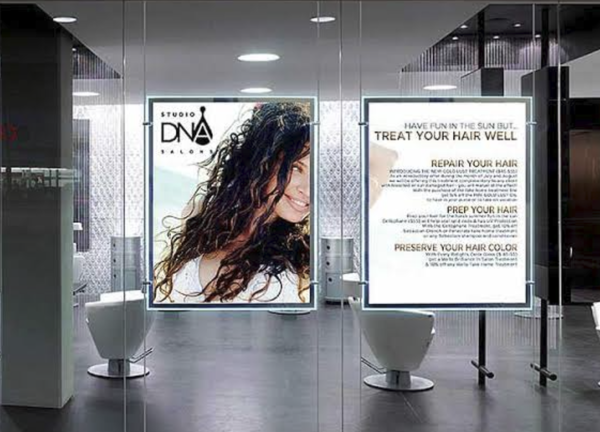
1. Retail promo window. The classic, and still the majority of what we ship. 1,500 nits punches through afternoon sun, the unit stands two steps from the till, and a Monday price change happens on Monday.
2. Wayfinding in malls and hospitals. A facilities officer updates tenants, clinic hours or a redirected entrance from an app instead of reprinting directories — and a unit can simply be wheeled to wherever the construction hoarding moves this quarter.
3. Hotel check-in and F&B menus. A P1.5 beside reception covers today’s arrivals at reading distance; a second outside the restaurant rotates breakfast, lunch and dinner. Menus change seasonally at best and weekly at worst — screens take the reprint out of both. Auto-dim earns its keep here: lobbies run late, and bright screens after midnight generate complaints, not covers.
4. Exhibition booths. Four cascaded units become one 2.4×1.8m canvas with no rigging points and no video-wall technician. Booth crews we work with budget one poster per metre of back wall and stop there.
5. Events and rental fleets. Rental houses buy ten to twenty units, charge by the event, reposition daily — the wheels are the product as much as the screen. USB-first on purpose: venues change, networks change, a stick always works.
What Breaks the Magic
Three failure modes, all preventable, all watched from the factory side.
Content is still your job. The screen removes printing, not design. A poster playing the same loop for a month is a very expensive print — the exact failure this hardware was bought to solve. Budget a few hours a month, or invest once in a template set your team can edit.
Cheap units ship 700-nit panels. Covered above, worth repeating because it’s the most common return we hear about: in a dim corridor they survive; behind a sunny window they vanish by mid-morning, and no firmware update fixes physics.
Wheels matter more than expected. Buyers assume the screen is the product; six weeks in, the daily use case turns out to be moving it — window by day, corridor by evening, out front for the weekend sale. Read the stability spec, not just the resolution spec: base weight (a 1.8m screen is a lever — ours sits low and heavy on purpose), wheel locks on every caster, anti-tip hardware where jurisdictions require it. If a supplier’s spec sheet lists pixel pitch but not base weight, that tells you what they care about.
And on price: quotes far below the ladder — a P1.5 offered at $800, say — mean reclaimed LEDs or a driver IC that ghosts after one humid summer. There’s a floor under this product, and it isn’t far below the numbers above.
Which Config for Which Job
| Use case | Recommended config | Budget guide |
| Retail window | P2.5, 1,500 nits, auto-dim, Wi-Fi, single-sided | $700–1,100/unit |
| Mall wayfinding | P2.5, auto-dim, 4G cloud for multi-floor updates | $900–1,200/unit |
| Hotel F&B / lobby | P1.5–P2, auto-dim sensor, Wi-Fi + USB backup | $900–1,500/unit |
| Exhibition booth | P1.5, 4-unit cascade, flight cases | $4,400–7,200 (4 units + cases) |
| Rental/events fleet | P2.5, USB-first, dual-sided as the upsell | $700–1,400/unit |
FAQ
How do I update content? Three chains. Wi-Fi from your phone — free, right for one store. USB stick — no network involved, still the most reliable in a mall with locked IT. 4G cloud — one dashboard for a fleet, scheduled campaigns, $2–6/month per SIM. Content push should never require the vendor’s subscription; if it does, price that fee into the total before you compare quotes.
Can multiple posters play synchronized content? Yes, through cascading: units link over the bus line, one acts as master, they render one canvas — four units make a 2.4×1.8m portrait wall. Verify with moving video at the demo; seam tearing only shows on motion.
Will it be readable through a sunny shop window? At 1,500 nits, yes — roughly three times an indoor LCD, and close to the phone-screen brightness your customers’ eyes are already tuned to. Get the nit figure on the quotation: low-cost units are commonly specced at 700 nits, and that is not a window display.
How long will it last? LEDs are rated 100,000 hours to half-brightness — over 11 years at 24/7. In our service logs the first failures are rarely the LEDs: power supplies and casters go first, both cheap and field-replaceable, which is why fleet orders ship with 5% spare parts. On delivery, power each unit through a full playlist for an hour before signing; the units that fail, fail early.
One big screen or several posters? Under roughly 5 m² of total need, posters win: no rigging, no permits in most jurisdictions, one person installs, and you can split them across locations later. Above that, a fixed video wall wins on pixel density per dollar — different product, different meeting, and we’ll tell you so on the call.
Send Three Numbers
Skip the long inquiry email. We price fastest from: quantity (pricing steps at 10+), pitch (P2.5 or P1.5), and placement (indoor, semi-outdoor, street-facing glass).
Send quantity, pitch and placement — itemized quote back within a day, sample units available before you commit a fleet. → Contact us for a quote