
Front Maintenance vs Rear Maintenance LED Display: The Real Cost Comparison Buyers Miss
A retail chain in Singapore ordered an 18 sqm indoor LED video wall for their Orchard Road flagship store. The spec was clean: P2.5 SMD, 1,500 nits, Novastar control, die-cast aluminum cabinets. The supplier quoted rear-maintenance panels at $1,050/m² — a perfectly reasonable price.
The installation team arrived on site and asked one question: “Where is the service corridor?”
There wasn’t one. The wall the LED display was mounted on was the back wall of the store, sharing a partition with the neighboring tenant’s stockroom. The landlord’s lease agreement prohibited cutting access hatches through the partition. The only way to service a failed module, power supply, or receiving card was from the front.
The result: the entire order had to be re-specified to front-maintenance panels. The new price was 1,280/m² — a 22% premium. On 18 sqm, that was 4,140 in additional hardware costs. But the real cost was the three-week delay while the new panels were manufactured and shipped, the re-booking of the installation crew, and the marketing campaign that had to be pushed back. Total project cost overrun: over $12,000.
This is not a story about a bad supplier. It is a story about the single most overlooked decision in LED display procurement: how will you service this screen after it is installed?
Most buyers spend hours comparing pixel pitch, brightness, and refresh rate—and zero minutes thinking about maintenance access. The maintenance decision is usually made by default: whatever the supplier quotes is what gets installed. But front-maintenance and rear-maintenance LED displays are fundamentally different products with different cost structures, different installation requirements, and different total costs of ownership that diverge over the life of the display.
This guide breaks down the real costs—not just the panel price—and gives you a decision framework so you specify the right maintenance type before the installation crew shows up and asks where the service corridor is.
If you are still deciding on pixel pitch, read our Small Pitch LED Display Buying Guide first. This guide assumes you have already selected your pitch and technology and are now deciding on the cabinet maintenance type.
The short version (if you only have 30 seconds)
| Factor | Front Maintenance | Rear Maintenance |
| Panel price premium | +15–25% over rear-access | Baseline (cheapest) |
| Installation space needed | 50–100 mm behind panel | 600–800 mm service corridor behind panel |
| Module replacement time | 30–60 seconds (magnetic / magnetic-screw) | 2–5 minutes (open rear door, unscrew, swap) |
| Downtime during service | Minimal (front-facing, no scaffold needed) | Moderate (requires rear access, may need staging) |
| Best for | Wall-mounted, space-constrained, retail, lobbies | Freestanding, large video walls, rental, budget projects |
| Typical lifespan impact | Identical (maintenance type does not affect LED lifespan) | Identical |
The one-sentence rule: If you cannot guarantee 600+ mm of clear space behind the display for its entire lifetime, you need front maintenance. If you can, rear maintenance will save you 15–25% on hardware—but only if you actually use that space for servicing.
What “front maintenance” and “rear maintenance” actually mean
Front Maintenance (Front Access / Front Service)
A front-maintenance LED panel is designed so that every serviceable component—LED module, power supply, receiving card, and cables—can be removed and replaced from the front of the display without accessing the back. This is achieved through one of three mechanisms:
- Magnetic modules: Each LED module is held in place by strong neodymium magnets embedded in the module frame. A technician uses a magnetic extraction tool to pull the module straight off the front. This is the fastest method — a module can be removed and replaced in under 60 seconds. Common on indoor small-pitch displays (P0.9–P2.9) and premium retail installations.
- Magnetic-screw hybrid: Modules use a combination of magnets for alignment and a single thumbscrew or quarter-turn fastener for security. Slightly slower than pure magnetic but more vibration-resistant—common on outdoor front-maintenance panels and taxi-top displays.
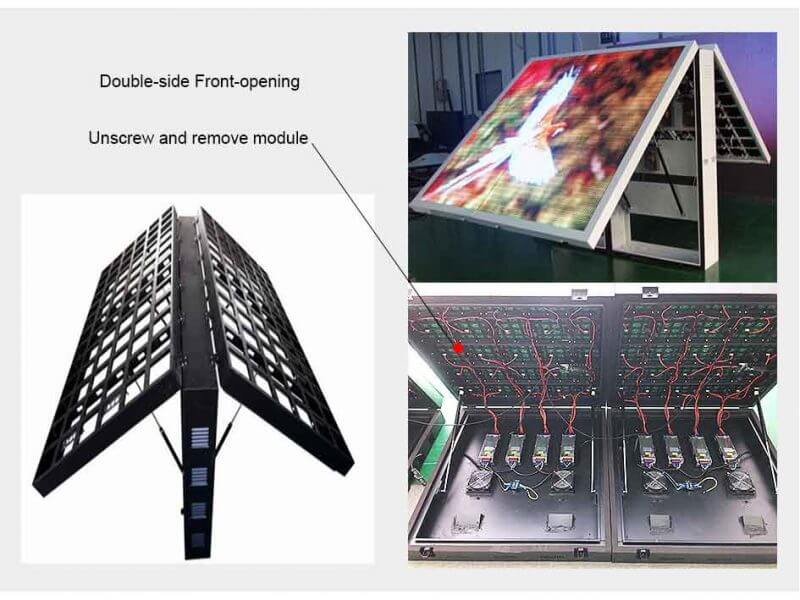
- Front-opening cabinet: The entire cabinet front frame hinges open like a door, exposing the internal components. Used on larger-format outdoor cabinets where individual module removal from the front would be impractical.
Key constraint: Front-maintenance panels require a flush or near-flush wall mount. The panel itself is typically 80–120 mm deep (including mounting brackets). The wall behind it needs to be flat and structurally sound enough to support the panel weight without a rear frame.
Rear Maintenance (Rear Access / Rear Service)
A rear-maintenance LED panel is serviced from the back. The cabinet has a rear door or removable back panel that opens to expose the power supplies, receiving cards, and wiring. LED modules are screwed in from the rear — to replace a module, you open the back of the cabinet, unscrew the module from behind, push it out, and insert the new one.
Key constraint: Rear-maintenance panels require a service corridor of at least 600 mm (recommended 800 mm) behind the entire display surface. This space must remain accessible for the lifetime of the installation—not blocked by furniture, storage, or subsequent tenant modifications.
The hybrid you should know about: Dual-Maintenance (Front + Rear)
Some premium cabinet designs support both front and rear access. The modules are magnetic from the front (for quick module swaps) and the rear door opens for power supply and receiving card service. These cost 25–35% more than rear-only panels but eliminate the service corridor requirement while retaining rear access for major component service. They are increasingly common in high-end corporate installations where the client wants maximum flexibility.
The cost comparison: hardware, installation, space, labor, and TCO
1. Hardware cost
| Cabinet type | Typical FOB price (P2.5 indoor SMD, per m²) | Premium over rear-maintenance |
| Rear maintenance (die-cast aluminum) | 900–1,100 | Baseline |
| Front maintenance (magnetic, die-cast) | 1,080–1,350 | +18–25% |
| Front maintenance (magnetic-screw, outdoor) | 1,250–1,600 | +25–35% |
| Dual maintenance (front + rear) | 1,200–1,500 | +25–35% |
Prices are FOB Shenzhen for tier-1 indoor SMD panels with standard NovaStar or Colorlight control, single-order quantity 20–50 sqm. Actual prices vary by order size, cabinet material, LED chip brand, and component specifications.
Why front-maintenance panels cost more: The magnetic extraction system, precision-milled module frames, and front-access cable routing require tighter manufacturing tolerances. The cabinet frame must be stronger to support front-loaded module weight without rear bracing. Magnetic modules use embedded neodymium magnets (8–16 per module), which add 2–5 per module in material cost alone. On a P2.5 panel with 16 modules per square meter, that is 32–80/m² in magnets alone—before the frame machining and cable management premium.
2. Installation and mounting cost
| Cost item | Front maintenance | Rear maintenance |
| Wall mounting bracket | 40–70/m² (flush mount) | 25–45/m² (rear frame) |
| Service corridor construction | $0 (not required) | 0 if space exists; 200–$600/m² if wall modification needed |
| Installation labor (per sqm) | 15–25/m² (mount, align, calibrate) | 20–35/m² (mount, frame, wire, rear-door install) |
| Structural reinforcement | Wall must support 35–55 kg/m² | Wall or freestanding frame must support 30–45 kg/m² |
The installation cost gap narrows when you account for the service corridor. If your installation site already has usable space behind the display (a stockroom, a utility corridor, a dropped-ceiling void), rear maintenance adds almost no installation cost. If it does not — and you need to build or modify a wall to create rear access — the construction cost can exceed the hardware savings many times over.
3. Space cost (the hidden line item nobody quotes)
This is the cost that catches buyers off guard. It is never on the supplier’s quote, and it is rarely discussed until the installation crew arrives.
| Display size | Rear-access corridor needed | Floor area consumed | At $800/m² retail floor value |
| 10 sqm display | 600 mm × 5 m = 3.0 m² | 3.0 m² | $2,400 |
| 20 sqm display | 600 mm × 8 m = 4.8 m² | 4.8 m² | $3,840 |
| 40 sqm display | 800 mm × 12 m = 9.6 m² | 9.6 m² | $7,680 |
| 80 sqm display | 800 mm × 18 m = 14.4 m² | 14.4 m² | $11,520 |
Calculations assume a rectangular display with perimeter-based corridor access. Retail floor value is illustrative—actual opportunity cost varies by location and property type.
In a retail store on Orchard Road, where floor space is valued at 800–1,500/m²/month, dedicating 5 m² to a service corridor that is used twice a year is an enormous hidden cost. In a corporate lobby, the corridor space may have near-zero opportunity cost. In a control room, the service corridor may already exist as part of the room layout.
This is why the “front maintenance costs 20% more” calculation is misleading. The 20% hardware premium may be less than the floor-area value of the service corridor you would need to reserve for rear access. Always calculate space cost before deciding.
4. Service labor and downtime cost
| Service event | Front maintenance | Rear maintenance |
| Single module replacement | 30–60 sec (magnetic pull, swap, done) | 3–5 min (open rear door, unscrew, push out, insert, re-screw, close) |
| Power supply replacement | 5–10 min (remove 2–3 modules, swap PSU, replace modules) | 3–5 min (open rear door, swap PSU, close) |
| Receiving card replacement | 8–15 min (remove modules, access card, swap, replace modules) | 3–5 min (open rear door, swap card, close) |
| Full cabinet service | 20–40 min (remove all front modules, service, reassemble) | 10–15 min (open rear door, service, close) |
For module replacements — the most common service event, accounting for 70–80% of all field service calls — front maintenance is dramatically faster. For component-level service (power supplies, receiving cards), rear maintenance is faster because the components are directly accessible without removing modules first.
Downtime cost context: In a retail flagship running a promotional campaign, one dark module on a 20 sqm wall is visible to every customer who walks in. If your nearest technician is 2 hours away and the service event takes 5 minutes (front) vs 15 minutes (rear), the difference is negligible. But if the display is in a control room running 24/7 operations, every minute of downtime has a measurable operational cost — and front-access module swaps minimize the most common failure type.
5. Total cost of ownership over 5 years
Let us model a real comparison: a 20 sqm indoor P2.5 SMD video wall in a corporate lobby, 5-year ownership period.
| Cost category | Front maintenance | Rear maintenance |
| Panel hardware (20 sqm) | 24,000 (1,200/m²) | 20,000 (1,000/m²) |
| Mounting brackets | $1,000 | $700 |
| Installation labor | $400 | $500 |
| Service corridor construction | $0 (wall-mounted flush) | $0 (lobby has rear access) |
| Floor area opportunity cost (5 yr) | $0 | $0 (corridor is non-revenue space) |
| Spare modules (5% kit) | $1,200 | $1,000 |
| Service calls (est. 8 over 5 yr) | 1,600 (200/call, 40 min each) | 2,000 (250/call, 60 min each) |
| Power supply replacements (est. 3) | 450 (150/each, modules removed) | 300 (100/each, rear access) |
| 5-year TCO | $28,650 | $24,500 |
In this scenario — where the lobby already has rear access space — rear maintenance is 14.5% cheaper over 5 years. The hardware premium of front maintenance ($4,000) is never recovered.
Now let us model the same display in a retail store with no rear access:
| Cost category | Front maintenance | Rear maintenance |
| Panel hardware (20 sqm) | $24,000 | $20,000 |
| Mounting brackets | $1,000 | $700 |
| Installation labor | $400 | $500 |
| Service corridor construction | $0 | $4,800 (wall modification + access hatch) |
| Floor area opportunity cost (5 yr) | $0 | 23,040 (4.8 m² × 800/m²/month × 60 months) |
| Spare modules (5% kit) | $1,200 | $1,000 |
| Service calls (est. 8 over 5 yr) | $1,600 | $2,000 |
| Power supply replacements (est. 3) | $450 | $300 |
| 5-year TCO | $28,650 | $52,340 |
In the retail scenario, front maintenance is 45% cheaper over 5 years. The $4,000 hardware premium is recovered in the first month of avoiding the service corridor’s floor-area opportunity cost.
The TCO calculation changes completely depending on whether you have rear access space. This is the single variable that determines which maintenance type wins.
5 real-world scenarios: which to specify and why
Scenario 1: Retail storefront video wall, 15 sqm, wall-mounted
The situation: A fashion retailer wants a 5 m × 3 m LED display on the back wall of their flagship store. The wall is shared with a neighboring tenant. No rear access is possible. Content is promotional video and brand imagery.
What to specify: Front-maintenance magnetic P2.5 SMD. Budget: 16,200–20,250.
Why: No rear access means rear maintenance is not an option without structural modification to a leased wall. Front-maintenance magnetic panels mount flush—80–100 mm total depth—and every component is serviceable from the front. Module swaps take under a minute, which matters in a retail environment where the screen is visible to customers at all times.
What you gain by going dual-maintenance: Flexibility for future reconfiguration. If the store layout changes in 3 years and rear access becomes available, you can service from the back too. The 25% premium may be worth it for a flagship location.
Scenario 2: Corporate lobby video wall, 30 sqm, freestanding
The situation: A multinational company’s headquarters lobby has a 10 m × 3 m LED display mounted on a freestanding structure with 1.2 m of clearance behind it (a utility corridor that also houses AV equipment racks). Content is corporate branding, wayfinding, and live data dashboards.
What to specify: Rear-maintenance P2.5 or P1.8 SMD. Budget: 27,000–33,000 (P2.5) or 42,000–54,000 (P1.8).
Why: The service corridor already exists and serves a dual purpose (AV equipment access). Rear-maintenance panels are cheaper, rear component service is faster, and the corridor is non-revenue space. There is no reason to pay the front-maintenance premium.
What you gain by going front-maintenance: Faster module swaps and the ability to reconfigure the display location without worrying about rear clearance. But since the corridor is already built and dual-purpose, the premium buys convenience, not capability.
Scenario 3: Control room video wall, 24 sqm, 24/7 operation
The situation: A utility company’s network operations center has a 8 m × 3 m video wall running SCADA dashboards, alarm panels, and security feeds 24 hours a day. Operators sit 2–3 meters away. The wall is mounted on a dedicated structural frame with a 900 mm rear service corridor.
What to specify: Dual-maintenance P1.5 COB. Budget: 55,200–72,000.
Why: Control rooms are the highest-stakes LED display environment. Any downtime has operational consequences. Dual-maintenance gives you front-access module swaps (fastest possible recovery for the most common failure) and rear-access component service (fastest recovery for power supplies and receiving cards). The 25–35% premium over rear-only is justified by the cost of downtime in a 24/7 operations center.
If budget does not allow dual-maintenance: Choose front-maintenance. Module failures are the most common service event, and front-access module swaps minimize downtime. The slower rear-component service is acceptable because power supply and receiving card failures are less frequent (estimated 1 every 2–3 years per cabinet).
Scenario 4: Hotel ballroom rental screen, 50 sqm, mobile
The situation: An AV rental company stocks 50 sqm of P2.9 panels for hotel ballroom events. The screens are flown on truss or ground-stacked. The crew sets up and tears down 40+ events per year.
What to specify: Rear-maintenance P2.9 SMD with rear-fly brackets. Budget: 35,000–47,500.
Why: Rental panels are serviced from the rear by default — the rear of the cabinet is always accessible when the screen is flown or ground-stacked. Rear-maintenance panels are cheaper (important when buying 50 sqm), lighter (no magnetic module hardware), and the rear door provides natural access for the cabling and daisy-chain power distribution that rental setups require. Front-maintenance adds cost and complexity with zero benefit in a rental context where the rear is always open.
What you gain by going front-maintenance on rental: Almost nothing. The only scenario where front access helps in rental is a ground-stacked screen pushed flush against a wall—but that is bad practice anyway (no airflow, heat buildup, or cable access issues). See our Rental LED Display Buying Guide for the full rental-specific decision framework.
Scenario 5: Outdoor building-facade display, 80 sqm, high-mount
The situation: A shopping mall wants an 80 sqm outdoor LED display mounted on the building facade, 8 meters above ground level. Content is advertising and wayfinding. The display is exposed to rain, dust, and temperature extremes.
What to specify: Front-maintenance outdoor P4.81 or P5.2 SMD (IP65). Budget: 88,000–120,000.
Why: High-mounted outdoor displays have no practical rear access — building a service platform behind an 8-meter-high facade display is structurally complex and expensive. Front-maintenance outdoor panels with magnetic-screw modules allow a technician on a boom lift to swap modules from the front in minutes. The 25–35% hardware premium is trivial compared to the cost of building a rear service platform (estimated 15,000–30,000 for structural steel, catwalk, and safety railings at that height).
What you lose by going rear-maintenance: The ability to service the display without a major construction project. If a power supply fails on a rear-maintenance facade display, you would need to either build a permanent service platform or rent a boom lift large enough to access the rear — both of which cost more than the front-maintenance hardware premium in a single service call.
The 4-rule decision framework
After shipping LED displays into projects across 30+ countries, we have boiled the maintenance-type decision down to four rules. Follow them in order.
Rule 1: If you cannot guarantee rear access for the lifetime of the display, specify front maintenance.
This is non-negotiable. If the space behind the display might be blocked—by furniture, storage, tenant modifications, or future layout changes—you need front maintenance. Do not assume “we’ll keep the area clear.” In leased spaces, the next tenant will not honor your service corridor plan.
Measure the depth available behind the display surface. If it is less than 600 mm, front maintenance is your only option. If it is 600–800 mm, rear maintenance is possible but tight. If it is 800+ mm, rear maintenance is comfortable.
Rule 2: Calculate the floor-area opportunity cost before comparing hardware prices.
The 15–25% hardware premium of front-maintenance panels is obvious. The floor-area cost of a rear-maintenance service corridor is hidden. Before you compare panel prices, calculate:
Corridor floor area × floor value per m² × months of expected display lifetime
If this number exceeds the hardware premium (typically 150–300/m²), front maintenance is cheaper in TCO terms. If the corridor space has zero opportunity cost (utility space, existing AV corridor, non-revenue area), rear maintenance wins on price.
Rule 3: Match maintenance type to failure frequency.
Over a 5-year period, a well-manufactured LED display will experience approximately:
| Failure type | Frequency (per 100 sqm, 5 years) | Service method |
| Individual LED module failure | 8–15 events | Front or rear |
| Power supply failure | 2–4 events | Rear (faster) or front (slower) |
| Receiving card failure | 1–2 events | Rear (faster) or front (slower) |
| Cable/connector issue | 1–3 events | Rear (faster) or front (slower) |
| Full cabinet replacement | 0–1 events | Either (remove entire cabinet) |
Module failures account for 70–80% of all service events. If you are choosing between front and rear maintenance, optimize for the most common failure type. Front maintenance wins on module replacement speed. Rear maintenance wins on component-level service speed. Since modules fail more often, front maintenance has the edge for operational uptime—unless your environment has unusually high power supply or receiving card failure rates (poor power quality, extreme temperatures, inadequate ventilation).
Rule 4: For 24/7 mission-critical installations, specify dual-maintenance if budget allows.
Control rooms, broadcast studios, trading floors, and emergency operations centers should not have to choose. Dual-maintenance panels give you front-access module swaps for the most common failure type and rear-access component service for everything else. The 25–35% premium is justified by the cost of downtime in environments where every minute of display unavailability has measurable operational impact.
If the budget does not allow dual maintenance, choose front maintenance for mission-critical installations. The module-swap speed advantage matters more than the component-service speed disadvantage, because modules fail more frequently.
The maintenance planning checklist (before you sign the PO)
Before you commit to a maintenance type, answer these six questions. If any answer gives you pause, reconsider your specification.
1. What is the minimum clear depth behind the display surface, and will it remain clear for 5+ years?
Measure it. Do not estimate. If it is under 600 mm, front maintenance is mandatory. If there is any chance it will be reduced during the display’s lifetime (new furniture, tenant build-out, storage creep), front maintenance is the safe choice.
2. Who will service the display, and how quickly can they reach it?
If your service technician is in-house and on-site, rear maintenance’s slower service time is less critical. If you rely on a third-party technician who travels 2+ hours to reach the site, front maintenance’s faster module swaps significantly reduce total downtime per service call.
3. Is the display in a customer-visible location where a dark module is unacceptable?
Retail stores, hotel lobbies, corporate boardrooms — a single dark module is immediately visible and damages brand perception. Front maintenance allows a module swap in under 60 seconds, often during a brief gap in customer traffic. Rear maintenance requires 3–5 minutes plus rear access staging.
4. Have you budgeted for spare modules, and are they stored on-site?
A front-maintenance panel with no spare modules on-site is no better than a rear-maintenance panel — the technician still has to wait for parts. Budget 5% spare modules (by area) and store them on-site. For a 20 sqm P2.5 wall, that is 1 sqm of spares—roughly 1,000–1,200. (Our LED display spec traps guide covers spare module planning in more detail.)
5. Does the installation environment have adequate ventilation behind the display?
Rear-maintenance panels with a service corridor naturally have better airflow. Front-maintenance panels mounted flush against a wall can trap heat, particularly in outdoor or high-brightness installations. Verify that your front-maintenance specification includes adequate ventilation (the panel frame should have bottom-to-top airflow channels). Poor ventilation voids warranties and accelerates LED degradation — see our IP rating and moisture guide for the environmental factors that kill LED displays.
6. If this is a leased space, does your lease agreement allow the maintenance access you are planning?
The Singapore retailer in our opening story assumed they could cut a rear access hatch. Their lease prohibited it. Read the lease before specifying rear maintenance. If the lease restricts wall modifications, front maintenance is your only option — and you should specify it before the supplier quotes, not after the installation crew arrives.
How Eyecatchmedia ships front- and rear-maintenance LED displays
We manufacture both front-maintenance and rear-maintenance LED panels at our Shenzhen production line across all pixel pitches from P0.9 to P5.2. We do not push one type over the other because the right answer depends on your installation site—not on our inventory.
For most wall-mounted indoor installations — retail stores, corporate lobbies, hotel reception areas — front-maintenance magnetic SMD is our most common recommendation. The flush mount, fast module swaps, and zero rear-access requirement make it the lowest-TCO choice for space-constrained sites.
For freestanding or truss-mounted installations with existing rear access—large video walls, rental staging, auditorium screens — rear-maintenance SMD is the standard. It is cheaper, lighter, and the rear access is already part of the installation geometry.
For mission-critical 24/7 installations — control rooms, broadcast studios, trading floors — dual-maintenance COB is our default specification. The front-access module swap and rear-access component service cover every failure type at maximum speed.
For outdoor facade and high-mount installations — building exteriors, stadium ribbon boards, and transportation hubs — front-maintenance outdoor IP65+ is the only practical choice. No rear access is available at height, and front-access magnetic-screw modules allow service from a boom lift in minutes.
Our maintenance-type product range:
| Maintenance type | Pixel pitch range | Technologie | Typical application | FOB price range (per m², indicative) |
| Front maintenance (magnetic) | P0.9–P2.9 | SMD / COB | Wall-mounted indoor, retail, lobby | 1,080–1,800 (SMD), 2,200–5,500 (COB) |
| Front maintenance (magnetic-screw) | P2.5–P5.2 | SMD (IP65+) | Outdoor facade, high-mount | 1,250–2,200 |
| Rear maintenance | P1.5–P5.2 | SMD / COB | Freestanding, rental, large video wall | 900–1,400 (SMD), 1,900–3,500 (COB) |
| Dual maintenance (front + rear) | P0.9–P2.5 | SMD / COB | Control room, broadcast, mission-critical | 1,200–1,800 (SMD), 2,500–6,000 (COB) |
All our panels ship with NovaStar or Colorlight control systems, a 5% spare module kit, and per-panel brightness and color calibration. Lead time is typically 15–25 days depending on order size and specification.
If you send us your installation site photos, wall structure, and rear-access availability, we will recommend the maintenance type — and we will tell you the same thing whether you buy from us or not.
FAQ: Front vs rear maintenance questions from real buyers
Q: Can I convert a rear-maintenance panel to front-maintenance after installation?
No. The maintenance type is determined by the cabinet and module frame design at the manufacturing stage. Rear-maintenance modules are screwed in from behind; front-maintenance modules use magnetic or magnetic-screw fastening. You cannot convert one to the other without replacing the entire cabinet and module set. If you are unsure about rear access, specify front maintenance from the start.
Q: Are front-maintenance magnetic modules less secure than screwed modules?
In indoor installations, no. Modern neodymium magnets used in front-maintenance modules are rated at 3–5 kg of pull force per magnet. A standard P2.5 module (320 × 160 mm) uses 4–8 magnets, providing 12–40 kg of total retention force — far more than the module’s own weight (typically 0.3–0.5 kg). The modules will not fall off under normal conditions.
In high-vibration environments (vehicle-mounted displays, taxi-top screens, marine installations), pure magnetic retention is not sufficient. Use magnetic-screw hybrid panels or full-screw rear-maintenance panels. See our Taxi Top LED Buying Guide for vibration-specific mounting guidance.
Q: How much weight can a front-maintenance panel put on a wall?
A typical front-maintenance P2.5 SMD panel weighs 28–35 kg/m² including the mounting bracket. A standard drywall partition with metal studs can support this if the brackets are anchored to the studs (not just the drywall). For heavier panels (COB, outdoor, and large-format) or for walls over 15 sqm, verify the wall’s load capacity with a structural engineer. Rear-maintenance panels on freestanding frames do not have this constraint — the frame carries the load.
Q: Do front-maintenance panels have worse thermal management than rear-maintenance?
They can, if mounted flush against an unventilated wall. Front-maintenance panels rely on internal convection (bottom-to-top airflow through the cabinet frame) to dissipate heat. If the wall behind the panel is insulated or the installation seals off airflow, heat can accumulate. Our front-maintenance cabinets include integrated ventilation channels—but the installer must verify that the mounting surface does not block them. Rear-maintenance panels with a service corridor have natural convection on both sides and typically run 3–5°C cooler.
Q: Is front maintenance worth it for a display that will rarely need service?
It depends on what “rarely” means. Even a high-quality LED display will experience 8–15 module failures per 100 sqm over 5 years. If your display is 20 sqm, expect 2–3 module failures over its lifetime. Each rear-maintenance module swap takes 3–5 minutes plus rear-access staging—manageable if the corridor is always clear. The question is not how often service is needed, but how disruptive each service event is when it happens. In customer-visible locations, the disruption cost of a slow module swap may exceed the hardware premium of front maintenance.
Q: What about maintenance for transparent LED displays?
Transparent LED displays (film, glass-mounted, and mesh) are almost always front-maintenance by design—they are applied to existing glass surfaces where rear access means cutting into the building envelope. The maintenance considerations are different from traditional LED panels. Contact us directly for transparent LED maintenance planning.
Q: Can I specify front maintenance for rental panels?
You can, but it is rarely worth the premium. Rental panels are always serviced from the rear during events (the rear of a flown or ground-stacked screen is accessible by definition). The front-maintenance premium buys you nothing in a rental context and adds 15–25% to your capital cost. Stick with rear-maintenance for rentals—see our Rental LED Display Buying Guide for the full rental decision framework.
This article is part of Eyecatchmedia’s LED display procurement guide series. For related reading:
- Small Pitch LED Display Buying Guide — when P1.5 is worth 3x the price of P2.5
- COB vs SMD LED Display: A Buyer’s Decision Tree — choose the right small-pitch technology
- LED Display Spec Traps: 5 Parameter Myths That Make You Overpay by 30% — avoid the most common procurement mistakes
- Rental LED Display Buying Guide — for event and staging applications
- LED Display IP Rating: The Moisture Truth — environmental factors that kill LED displays
Need a maintenance-type recommendation for your specific project? Send your installation site photos, wall structure details, and rear-access availability to [email protected]. We respond within 24 hours with a specification and a line-item quote—no obligation—and the same recommendation we would give whether you buy from us or not.